October 25, 2023
Release highlights
We’ve introduced a new guide for modifying configurations and parameters within the developer framework, and new features to the platform UI that enable you to remove blocks of content from documentation and work with your settings more effectively.
ValidMind Developer Framework (v1.22.0)
ValidMind Platform UI (v1.8.0)
Remove blocks from documentation
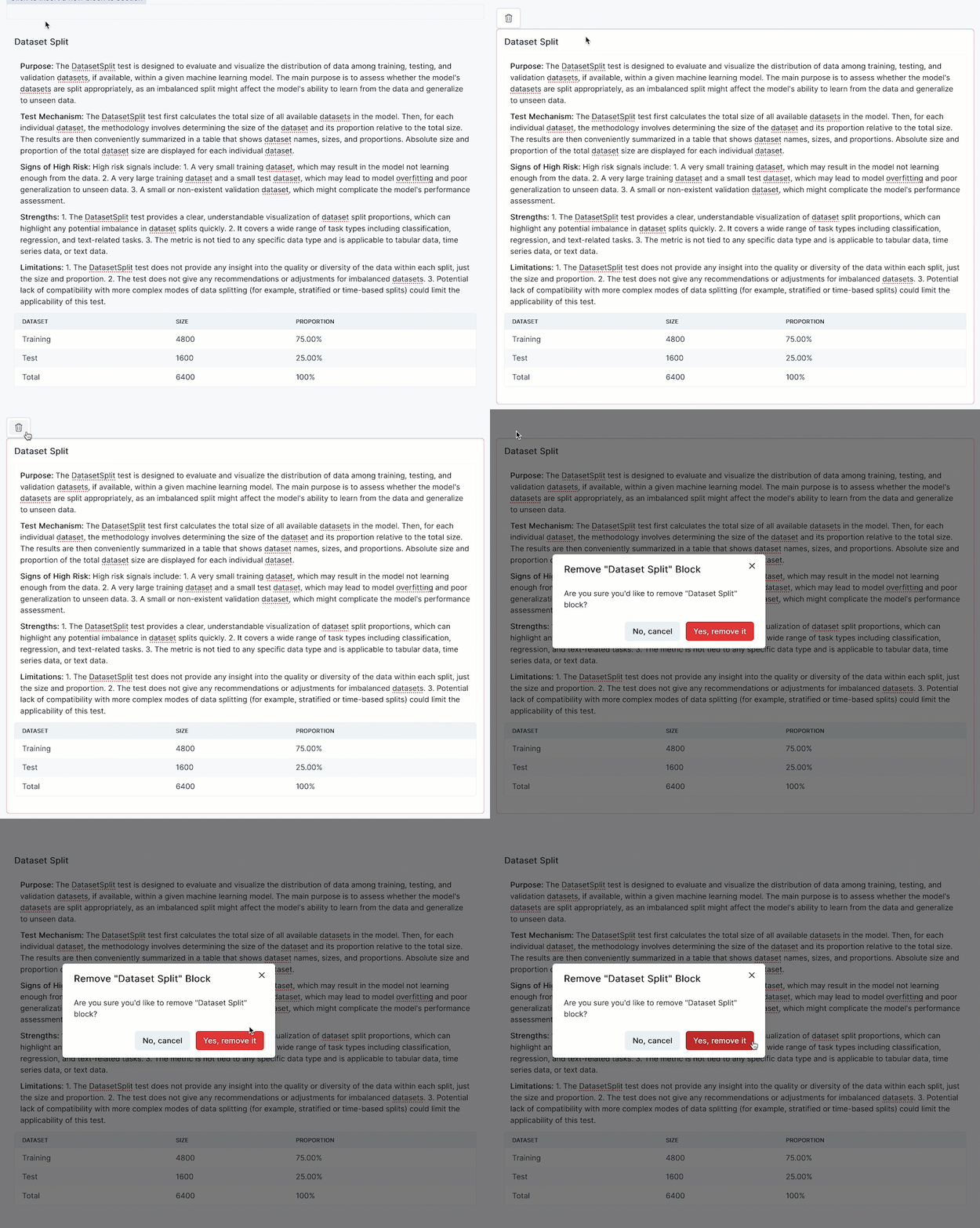
You can now remove blocks of text or test-related content from model documentation in the editor of the platform UI.
- This new feature gives you more control over your documentation and enables you to remove content that is no longer needed.
- To remove text blocks and test-driven blocks from model documentation, you first select the block you want to remove and click , either in the text-block’s toolbar or in the test-driven’s block single-button toolbar.
New Settings landing page
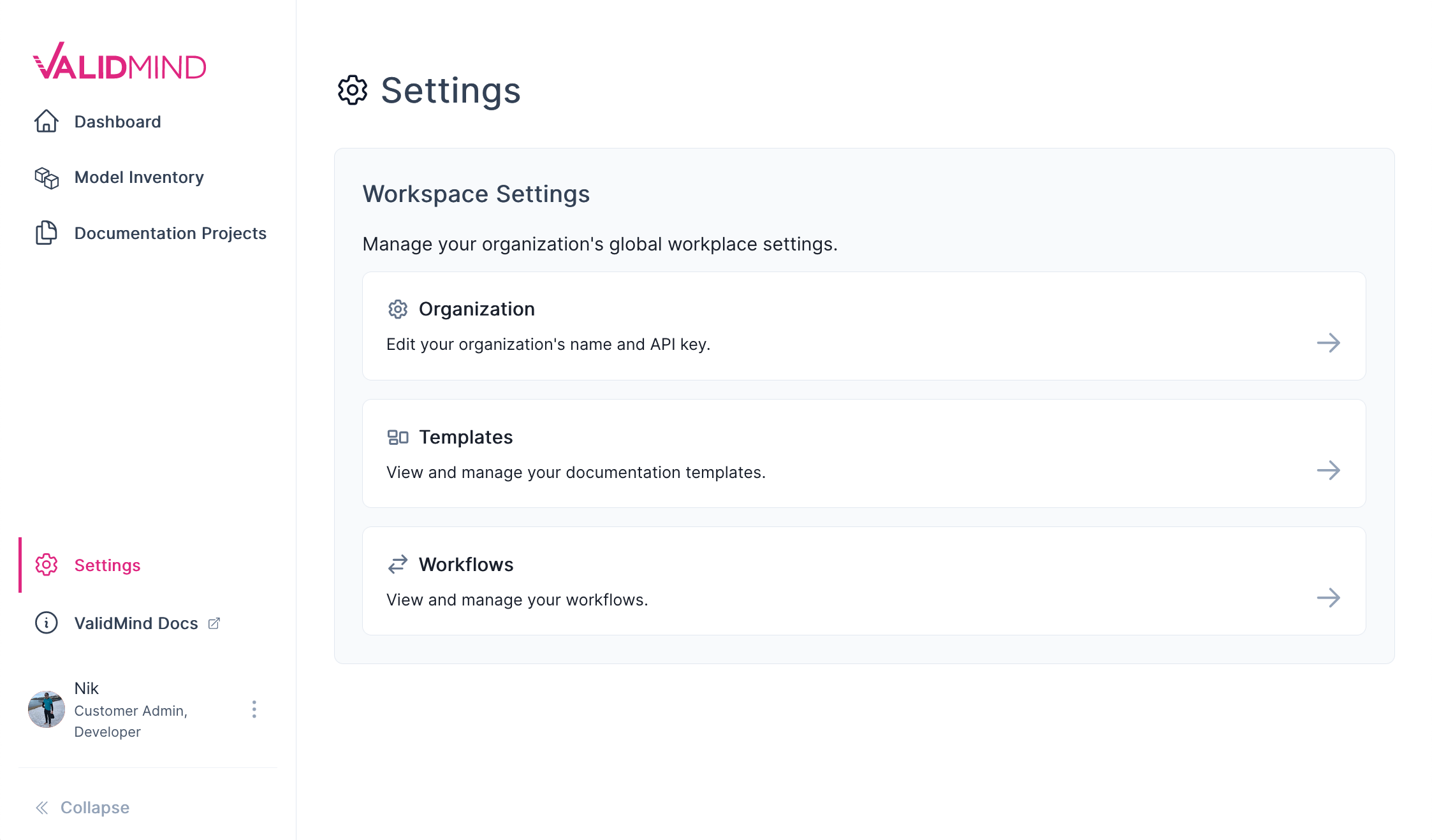
A new Settings landing page now organizes more of your settings for the ValidMind platform in one convenient place.
From this page you can manage:
- Your organization, including the name and the API and secret key you use to connect to the ValidMind platform.
- The documentation templates that standardize the documentation table of contents for your projects and configure the required validation tests for specific model use cases.
- Workflows that determine the statuses of your model and how it transitions through your model risk management process according to your requirements.
Enhancements
Rouge and Bert Score tests now show average scores
- Introduced
RougeMetricsAggregateandBertScoreAggregateto offer a high-level overview of model performance across a large number of text rows. - These tests complement the detailed row-by-row analysis provided by
RougeScoreandBertScore.
Tests for safety toxicity and bias in text summarization
We introduced several new tests to evaluate safety and bias risks in text summarization:
ToxicityScore: Measures safety riskToxicityHistogram: Provides a distribution of safety risk scoresRegardScore: Evaluates bias riskRegardHistogram: Shows distribution of bias risk scores
Bug fixes
Shap test issue resolved
- We set
matplotlibto version3.7.xinpyproject.tomlto fix an incompatibility with the latestmatplotlibversion (3.8.0). - This incompatibility was causing SHAP plot errors. We will keep track of
matplotlibreleases for future updates. Once fixed, we will consider updating the version.
Documentation updates
Platform overview rewrite
We expanded our platform overview to provide more background information about what ValidMind offers and how we enable you to comply with policies and regulations such as SR 11-7 and SS1/23.
QuickStart updates for the closed beta
We updated the QuickStart section of our documentation to reflect recent UI and sign-up flow changes.
Improved handling of Jupyter Notebooks
We now programmatically embed our Jupyter Notebooks in our documentation site and generate a downloadable notebooks.zip file with all notebooks and supporting datasets.
How to upgrade
ValidMind Platform UI
To access the latest version of the ValidMind Platform UI,1 hard refresh your browser tab:
- Windows:
Ctrl+Shift+RORCtrl+F5 - MacOS:
⌘ Cmd+Shift+ROR hold down⌘ Cmdand click theReloadbutton
ValidMind Developer Framework
To upgrade to the latest version of the ValidMind Developer Framework:2
In your Jupyter Notebook:
Locate the
%pip install -q validmindcell and replace the contents with:%pip install --upgrade validmindRun the edited code cell.
You may need to restart your kernel after running the upgrade package for changes to be applied.